Affiliate disclosure: Some links in this guide are affiliate links. If you buy through them we earn a small commission at no extra cost to you. We only recommend products we have personally tested or thoroughly researched.
A capsule wardrobe works because someone made a decision on your behalf before you got to the shop: these thirty items, chosen carefully, are all you need. Everything else is noise. The same principle applies to smart home devices, but nobody in the smart home industry has any incentive to offer you a curated thirty. The incentive runs the other way. More SKUs, more ecosystem lock-in, more recommended accessories. This guide is the version of the capsule wardrobe principle that the industry will not write for you.
Five devices. Named, priced, and chosen because each one earns its place in daily use across energy, lighting, comfort, voice control, and security. The rule that governs all of them: buy nothing else until you have used these for a month and identified a specific gap they do not fill. That gap will tell you what the sixth device should be. Buying without that information is how people end up with a drawer full of gadgets that worked fine in unboxing videos and have not been touched since. If you already own devices and are not sure what you have or what is working, the smart home audit guide is the right place to start before buying anything new.
The five capsule devices: a smart plug (£11/$14) for standby control, a smart bulb (£12/$15) for lighting automation, a smart speaker (£54/$50) for voice routines, a smart thermostat (£79/$99) if you pay your own bills, and a second smart plug or bulb as your most-needed extension. Total for all five: under £170/$200. Nothing else for the first month.
The Capsule Principle Applied to Smart Home
A capsule wardrobe works not because minimalism is virtuous but because friction is costly. When every item you own works with every other item, getting dressed takes thirty seconds. When you have bought things impulsively that do not go with anything else, getting dressed takes fifteen minutes of rummaging and regret. Smart home devices have the same dynamic. A set of five well-chosen devices that work together, controlled from one app with one voice assistant, takes seconds to operate. A drawer full of incompatible gadgets from four different ecosystems is a support ticket waiting to happen.
The competitor content in this space runs in two directions. Either it is a list of seventy-five automation ideas with no editorial filter, or it is an expensive showcase of integrated systems that assumes you own a house and have a weekend free to configure Home Assistant. The capsule smart home sits in the gap: specific enough to be actionable, simple enough to be done in one afternoon, cheap enough to start this week. If you are entirely new to smart home devices, read our beginner’s guide first for a plain explanation of what ecosystems and Matter actually mean before buying anything. For context on which 2026 devices are worth waiting for versus buying now, our CES 2026 smart home review covers what actually shipped and what is still vaporware.
The five devices were chosen against four criteria: does it run without daily input once configured, does it work with everything else in the set, is it renter-compatible with no permanent modifications, and does it address a genuine daily friction point rather than a theoretical use case. Every device passed all four. Several popular devices that did not pass are discussed in the skip section below.
The Five Devices and Why Each Earns Its Place
Each device in the capsule set covers one domain. The plug covers energy and standby waste. The bulb covers lighting and sleep support. The speaker covers voice control and routine automation. The thermostat covers heating, which is 55% of most UK households’ energy bills. The fifth slot is the extension: the second plug or bulb that addresses the specific gap your first month reveals. The set is incomplete without the fifth, and the fifth cannot be chosen well without the first four running first.
Device one. Put it behind the lamp you always forget, the television standby, or the kitchen radio. Set one schedule: off at midnight. That single automation eliminates one daily decision and cuts standby waste. The energy monitoring shows what the device behind it costs per month. Most people are surprised. No hub, no bridge, works with Alexa, Google Home, and Apple Home. The fastest payback of any smart home device: under one month from standby savings alone.
Start here . highest payback speedDevice two. Replace the bulb in your main living room or bedroom lamp. Set one schedule: warm light (2200K) from 8pm onwards. This addresses two things simultaneously: the lamp you control with a voice command, and the circadian lighting that supports better sleep. No hub needed for basic use. Works with all three ecosystems. The sleep evidence behind the 2200K schedule is covered in our zero-subscription wellness guide.
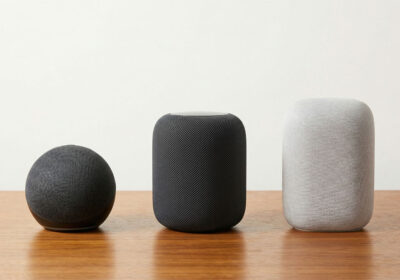
Sleep support + voice control from £15Device three. The voice trigger for everything else. Once you have a plug and a bulb to control, the moment you say “turn off everything” and both respond, the value becomes obvious. The Echo Dot’s built-in temperature sensor feeds into Alexa routines so automations can respond to actual room conditions. The widest device compatibility of any speaker. If you have an iPhone and privacy matters more than compatibility breadth, the HomePod mini at the same price is the alternative. Full comparison in our smart speakers guide.
Voice control for the whole setDevice four . conditional. Only buy this if you pay your own heating bills. If your landlord includes bills, skip this slot and use it for a second plug. If you do pay, this is where the largest real-world savings come from: 15–25% on heating in year one. Tado’s geofencing stops heating an empty home automatically. Compatible with most UK combi boilers. Check compatibility at tado.com before ordering. Inform your landlord before installing. Full comparison with Nest and Ecobee in our energy tools guide.
Conditional . only if you pay billsDevice five is deliberately unnamed. It is whatever the first month tells you is missing. If your main friction is still the kitchen lamp, it is a second smart plug. If the bedroom light matters more than the living room, it is a second bulb. If you find yourself wanting to trigger your morning routine from bed rather than the hallway, it might be a second Echo Dot. The fifth slot is a reward for patience, not a permission to expand before you know what you need. This is the hardest part of the capsule principle to follow, and the most important.
Capsule Smart Home Checklist: exact setup steps for each device, five automations for month one, and questions to ask before buying device five. Join the SAL newsletter and we will send it straight to your inbox.
What to Skip for the First Month
The devices below are not bad. Several are genuinely excellent. They are on the skip list because they add complexity before you have established a working baseline, require configuration knowledge that comes from experience rather than reading, or solve a problem that most people do not actually have in their first month of smart home ownership. Come back to all of them after the one-month rule.
Dedicated hubs (SmartThings, Hubitat, Home Assistant): Powerful when you have 20+ devices across multiple protocols. Overwhelming when you have five WiFi devices that already work without one. The Matter standard means most 2026 devices do not need a hub.
Smart blinds and curtain motors: £150–400 per window, complex installation in rentals, and motor reliability varies by brand. The energy savings and convenience are real but do not justify the cost until you have the rest of the stack running smoothly.
Whole-home energy monitors (Sense, Emporia): These require professional installation in your consumer unit and give you data that is not actionable until you have a thermostat and smart plugs establishing a baseline. Buy the thermostat and plugs first, measure for one billing cycle, then consider a monitor.
Smart doorbells and cameras: Most rented properties have lease restrictions on cameras and permanent doorbell installations. Battery-powered options exist but raise landlord permission questions. These belong in month three, not month one, and only after checking your lease.
The One-Month Rule
The one-month rule is the actual discipline that makes the capsule smart home work. Buy the four devices. Set up the basic automations. Use them for thirty days without adding anything. At the end of the month, you will know two things you could not have known before: which automations you actually use every day, and which gap in your setup genuinely causes friction. That combination is the correct brief for device five. Without it, device five is a guess.
The psychological pressure to expand runs continuously. New devices get reviewed, friends share their setups, and the algorithm serves you targeted ads for whatever you looked at last Tuesday. The one-month rule is a deliberate pause against all of that. It is not permanent minimalism. It is the period in which you gather the information needed to make a good decision about what comes next. The life modes guide covers the specific automations worth building in month one that will give you the clearest data about what you are actually missing.
- Week 1: Set up all four devices, connect to your chosen ecosystem, test each one works. Set one schedule per device: plug off at midnight, bulb warm from 8pm, thermostat eco when you leave.
- Week 2: Build one routine: a Goodnight or Leaving mode that combines at least two devices into one command. Use it every day.
- Week 3: Note what you are still doing manually that the devices could handle. Write it down specifically, not vaguely.
- Week 4: Review your energy monitoring data on the plug. Check your heating app for usage trends. Confirm you are using the automations you set up, not bypassing them.
- End of month: Identify the one specific gap. That is device five. Buy only that.
Total Cost and What You Get
| Device | Cost (UK) | Cost (US) | Subscription | Annual saving |
|---|---|---|---|---|
| Tapo P110 smart plug | £11 | $14 | None | £30–50 standby savings |
| Hue White Ambiance bulb | £15 | $20 | None | Sleep benefit (no direct saving) |
| Echo Dot 5th gen | £54 | $50 | None for core use | Time saving (routine automation) |
| Tado thermostat | £79 | $99 | None (optional £2.99/mo) | £135–225 heating savings |
| Device 5 (TBD after month 1) | £11–54 | $14–50 | None | Depends on gap identified |
Total hardware cost for devices one through four: £159 / $183. Note that some devices in the smart home ecosystem carry ongoing monthly fees once set up. The subscription audit covers exactly which ones do and what you can expect to pay annually. Total annual saving from devices one and four alone: £165–275 / $207–345 at typical UK and US energy costs. The hardware pays for itself in year one if you pay your own bills. If your bills are included in rent, the thermostat slot is replaced by a second plug or bulb and the payback calculation shifts to comfort and time rather than direct savings. Neither version requires a subscription to any service to function.
Capsule Smart Home Checklist: exact setup steps for each device, five automations for month one, and questions to ask before buying device five. Join the SAL newsletter and we will send it straight to your inbox.
Some links in this guide are affiliate links. If you buy through them we earn a small commission at no extra cost to you. We only link to products we have personally tested or thoroughly researched.
Common Questions
What is the minimum number of smart home devices you actually need?
Five covers everything most people genuinely use daily: one smart plug, one smart bulb, one smart speaker, one smart thermostat if you pay your bills, and one extension device chosen after a month of use. Every device beyond five should earn its place by addressing a specific gap, not by existing in a buying guide.
Do all five capsule devices need to be the same brand?
No. Matter certification in 2026 means TP-Link plugs, Philips Hue bulbs, and Amazon Echo speakers work together reliably in the same ecosystem. Choose one primary platform (Alexa, Google Home, or HomeKit based on your phone) and any Matter-certified device will connect to it without bridges or workarounds.
What if I do not pay my own energy bills?
Skip the thermostat slot entirely. Your capsule set becomes: two smart plugs, one smart bulb, one smart speaker, and device five after month one. The plug on standby devices still saves energy the landlord pays for, which is worth doing regardless. The lighting and routine automations deliver full value with or without a thermostat.
Is the capsule approach compatible with a rented flat?
All four named devices are fully renter-compatible. The plug and bulb leave no trace. The Echo Dot plugs in and moves with you. The thermostat replaces the existing one and is reversed on move-out in twenty minutes with the original reinstalled. Nothing in the capsule set requires drilling, wiring, or landlord permission beyond the thermostat, where you should inform your landlord before installation even though the process is reversible.



Leave a Reply