Affiliate disclosure: Some links in this guide are affiliate links. If you buy through them we earn a small commission at no extra cost to you. We only recommend products we have personally tested or thoroughly researched.
My mother is 74 and lives alone in the house I grew up in. She is sharp, independent, and would hate the word “monitoring.” That word is the reason most smart home guides for ageing parents read like surveillance manuals: motion sensors that alert you when she has not moved, cameras in the hallway, location tracking on her phone. I understand why those exist. I also understand why she would refuse all of them, and why refusing is completely reasonable.
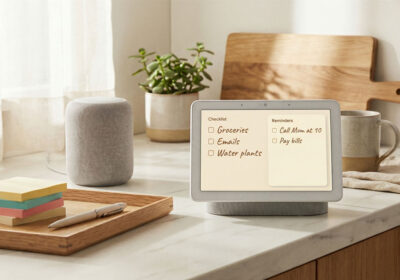
What she agreed to: a lamp on a smart plug that comes on at dusk automatically, an Echo Show in the kitchen that displays a family photo and tells her the weather when she asks, and a daily reminder at 7pm that says her name and asks if she has eaten dinner. Three devices, one weekend visit, fifteen minutes of setup. Eight months later, everything still works. She has not needed to learn anything new. I have not needed to go back and fix anything. That is the version of smart home care that most content never shows you.
The consent-first rule: agree on everything before you install anything. The three devices that do the most good with the least friction: a smart plug for lights at dusk, an Echo Show for visual reminders and family photos, and one daily spoken reminder set up remotely. Total cost around £130 / $150. Managed from your phone after the first visit. No cameras, no tracking, nothing that feels like surveillance.
The Consent-First Rule (Non-Negotiable)
Do not install anything without having a specific conversation about what it is, what it does, and why you want to set it up. This is not a procedural nicety. It is the difference between technology that supports someone’s independence and technology that undermines it. A parent who feels monitored without being asked will feel less safe in their own home, not more. The conversation is the most important part of this guide.
The conversation has three parts. First, explain what you want to set up in plain terms: “A lamp that comes on by itself when it gets dark, so you do not have to remember.” Second, explain what it does not do: “It does not track you, send me any information, or do anything you cannot see.” Third, ask if they are comfortable with it and whether they want to try something different. Be ready to hear no, and accept it.
The principle extends to every device in this guide. Some people will welcome a smart speaker. Others will find the idea of a microphone in the kitchen unsettling. That is a valid position. Start with the device they are most comfortable with and add from there only when they ask. The goal is that the technology serves them, not your peace of mind.
What Actually Helps Day-to-Day
The automations that help most are the ones that address real friction without requiring new behaviour. Lights that come on automatically at dusk remove a task that is easy to forget and disorienting to come home to. A spoken daily reminder does not require finding a phone, reading glasses, or a calendar. A screen that shows the day’s date and upcoming appointments provides orientation without demanding interaction. These are small things. Over the course of a week, they add up to a measurably less effortful daily life.
Lights at dusk is the single highest-value automation in this context. For older adults living alone, the transition from daylight to dark is a moment that can feel disorienting and unsafe if lighting is not in place. A smart plug on one or two key lamps, set to a sunset-triggered schedule, means the home is always lit before it feels dark. The schedule adjusts automatically with the seasons. No interaction needed from the person. No app to open, no button to press. Just a lamp that comes on when it should.
Medication and meal reminders are the second most impactful automation. A daily spoken reminder at a consistent time does not require the person to check a phone or find a calendar. It simply happens. The reminder language matters: “Margaret, it is 7pm. Have you had dinner?” is warmer than “Reminder: dinner.” Take the time to write the reminder text as you would speak to the person, not as a calendar entry. It takes an extra thirty seconds and makes a noticeable difference.
The science behind consistent evening light and its effect on sleep quality and orientation is covered in our circadian lighting guide. The short version: warm, consistent lighting in the evening hours supports melatonin production and reduces the disorientation that can come with the shift to dark. For older adults, this effect is more pronounced than it is in younger people.
Care Mode Setup Checklist: consent conversation guide, dusk lighting and reminder steps, and troubleshooting for the three things most likely to stop working. Join the SAL newsletter and we will send it straight to your inbox.
The Setup: One Weekend Visit
Everything in this guide can be set up in one visit of a few hours. The setup runs in three stages: devices plugged in and connected to the home’s Wi-Fi, automations configured in the app on your phone, and the person shown what each thing does and given the chance to try it. The third stage is the one most people skip, and it is the one that determines whether the technology keeps being used six months later.
Stage 1: Devices (30 minutes)
- Plug the smart plug into the socket for the main living room lamp. Plug the lamp into the smart plug. Open the Tapo app and connect the plug to the home Wi-Fi. Name it “Living room lamp.”
- Place the Echo Show on the kitchen worktop or a surface visible from the main sitting position. Plug it in, follow the on-screen setup, and connect to the Wi-Fi. Log in with your own Amazon account, not a new one. This means you can manage it remotely from your phone.
- Set up the smart plug schedule: in the Tapo app, tap the plug, tap Schedule, tap the plus icon, select Sunset as the trigger. Set it to turn on. Save. Done. It will adjust automatically with the seasons.
Stage 2: Reminders (15 minutes)
In the Alexa app on your phone: tap More, then Reminders, then the plus icon. Write the reminder text exactly as it will be spoken. Set the time, set it to Recurring, and choose every day or specific days. Select the Echo Show in the person’s home as the device. Save. Test it immediately by briefly changing the time to one minute from now, listening to how it sounds, then correcting the time. Ask whether the volume and the words are right. Change them if not.
Stage 3: The handover (15 minutes)
Show the person what each device does by demonstrating it, not describing it. Turn the smart plug on and off so they see the lamp respond. Let them hear the reminder. Show them that the Echo Show will answer questions if they say “Alexa” and ask something. Let them try it themselves. Ask what feels useful and what feels strange. If something feels strange, remove it or turn it off. The handover is not a tutorial. It is a conversation about what they want the technology to do for them.
Managing It Remotely
Once the devices are set up and linked to your Amazon account, you can update reminders, change schedules, and add new routines from your own phone without returning to the property. The Alexa app shows all devices linked to your account regardless of location. A reminder that needs updating . the doctor’s appointment, the changed medication time . takes thirty seconds from anywhere.
Drop-in on the Echo Show, if the person agrees to it, allows a video call from your Alexa app directly to their device without the person needing to pick up a phone. They see your face on screen and can respond by speaking. For families who do not live nearby, this is a meaningful improvement over a phone call that does not get answered. Set it up only with explicit consent and make sure the person knows how to turn the screen off if they want privacy.
The most important remote management habit is checking in by voice, not by app. A weekly phone call asking whether everything is working well is more useful than checking device activity logs. The logs tell you whether the lamp came on. The conversation tells you whether the person felt safer because of it. If you want ideas on structuring what to automate and how to describe it to someone new to smart home devices, our life modes guide covers the same three-mode framework adapted for any household.
Devices Worth Buying
The dusk-triggered lamp. Put it behind the main living room lamp. Set a sunset schedule in the Tapo app. It adjusts automatically through the year. No interaction required from the person. No hub needed. Works with Alexa and Google Home. This is the highest-value single device in this context and it costs £11. Buy two if there is a second lamp worth automating.
Start here . highest impactThe kitchen companion. Displays the time, date, weather, and upcoming reminders on a persistent screen without any interaction. Plays spoken reminders at the set time. Answers questions by voice. Shows family photos from an Amazon Photos album you set up. Allows Drop-In video calls if the person agrees. Managed entirely from your Amazon account via the Alexa app on your phone.
Best for: visual reminders, video callsIf the person uses overhead lighting rather than floor lamps, a smart bulb in the main ceiling fitting gives you the same dusk-triggered schedule in the most prominent light in the room. Warm light in the evening also reduces glare and supports better sleep onset. No hub needed for basic scheduling via the Hue Bluetooth app. See our circadian lighting guide for the science.
For overhead lighting, warm evening lightWhat Not to Install
Cameras without explicit, informed consent: A camera inside someone’s home, even a doorbell camera that covers the entrance, is a significant decision. The person needs to understand what it records, where that data goes, and who can access it. If they would not have agreed to it if asked clearly, do not install it.
Motion sensors that send you alerts: A motion sensor that texts you every time the person moves from room to room is monitoring, not care. If you genuinely need this level of oversight for safety reasons, that conversation belongs with a GP or social care professional, not in a smart home app.
Complex systems that require the person to learn new behaviour: Anything that requires the person to remember a new phrase, press a new button regularly, or troubleshoot connectivity problems is a burden, not a help. The automation that runs without input is the automation that keeps working six months later.
Care Mode Setup Checklist: consent conversation guide, dusk lighting and reminder steps, and troubleshooting for the three things most likely to stop working. Join the SAL newsletter and we will send it straight to your inbox.
Some links in this guide are affiliate links. If you buy through them we earn a small commission at no extra cost to you. We only link to products we have personally tested or thoroughly researched.
Common Questions
What smart home devices are best for elderly people living alone?
The three most useful: a smart plug for automated dusk lighting, an Echo Show for visible reminders and family photos, and a spoken daily reminder set via the Alexa app. All three work without the person learning anything new. The smart plug requires no interaction at all. The Echo Show answers basic questions by voice. The reminder fires automatically at the same time each day.
How do I set up reminders for an elderly parent using Alexa?
Alexa app: More, Reminders, plus icon. Write the text exactly as it will be spoken. Set the time and select Recurring. Choose the Echo device in their home. Save. Test by setting the time one minute ahead, listening, then correcting. You can update, pause, or delete reminders remotely from your phone at any time without visiting.
Is it ethical to install smart home devices without someone’s consent?
No. The conversation comes first, every time. Explain what each device does, what it does not do, and why you want to set it up. Ask if they are comfortable. Accept a no gracefully and start with whatever they are comfortable with. Technology installed without consent does not build safety . it undermines the trust that makes it useful.
What if the Wi-Fi is unreliable or the person does not have broadband?
Smart home devices require a stable Wi-Fi connection to function. If broadband is unreliable, the most resilient option is a smart plug with a physical schedule (some models have on-device scheduling that works even without internet access). Alternatively, a battery-powered smart lamp with a built-in timer requires no Wi-Fi at all. The Echo Show requires consistent broadband. If the connection is genuinely unreliable, start with a plug-in timer lamp rather than a connected device. Our beginner’s guide covers connectivity requirements for all device types.



Leave a Reply